Documentation Index
Fetch the complete documentation index at: https://docs.chemolytic.com/llms.txt
Use this file to discover all available pages before exploring further.
An experiment is where you train predictive models. You give it a dataset and a target property, choose a mode, and Chemolytic produces trained models you can deploy.
Hierarchy: experiment, job, trial
Three concepts, nested:
| Level | Description |
|---|
| Experiment | A container for one prediction problem (one dataset + one target property). Holds many jobs. |
| Job | One unit of background work. A job runs one or more trials. |
| Trial | A single trained model: one preprocessing pipeline + one algorithm + one set of hyperparameters. |
You don’t usually think about jobs in CoPilot mode. The hierarchy matters most in Scientist mode, where you create jobs one at a time.
Regression vs classification
The type of your target property determines whether the experiment is a regression or a classification problem. You don’t choose this manually.
| Property type | Experiment type | Models predict |
|---|
| Continuous | Regression | A number (e.g., 18.5 °Bx) |
| Categorical | Classification | A category (e.g., “Arabica”) |
This affects:
- Which algorithms are available
- Which metrics are reported
- How results are visualized
CoPilot vs Scientist
Two modes for building models, set when you create the experiment.
| Mode | Best for | What it does |
|---|
| CoPilot | Quick results, no chemometrics expertise needed | Automatically tests 1000-3000 combinations of preprocessing + models, picks the best |
| Scientist | Specific configurations, expert users | You add jobs one at a time with full control over preprocessing, model, and hyperparameters |
You can’t switch modes after creation. If you change your mind, create a new experiment.
Experiments page
Go to Experiments in the project sidebar.
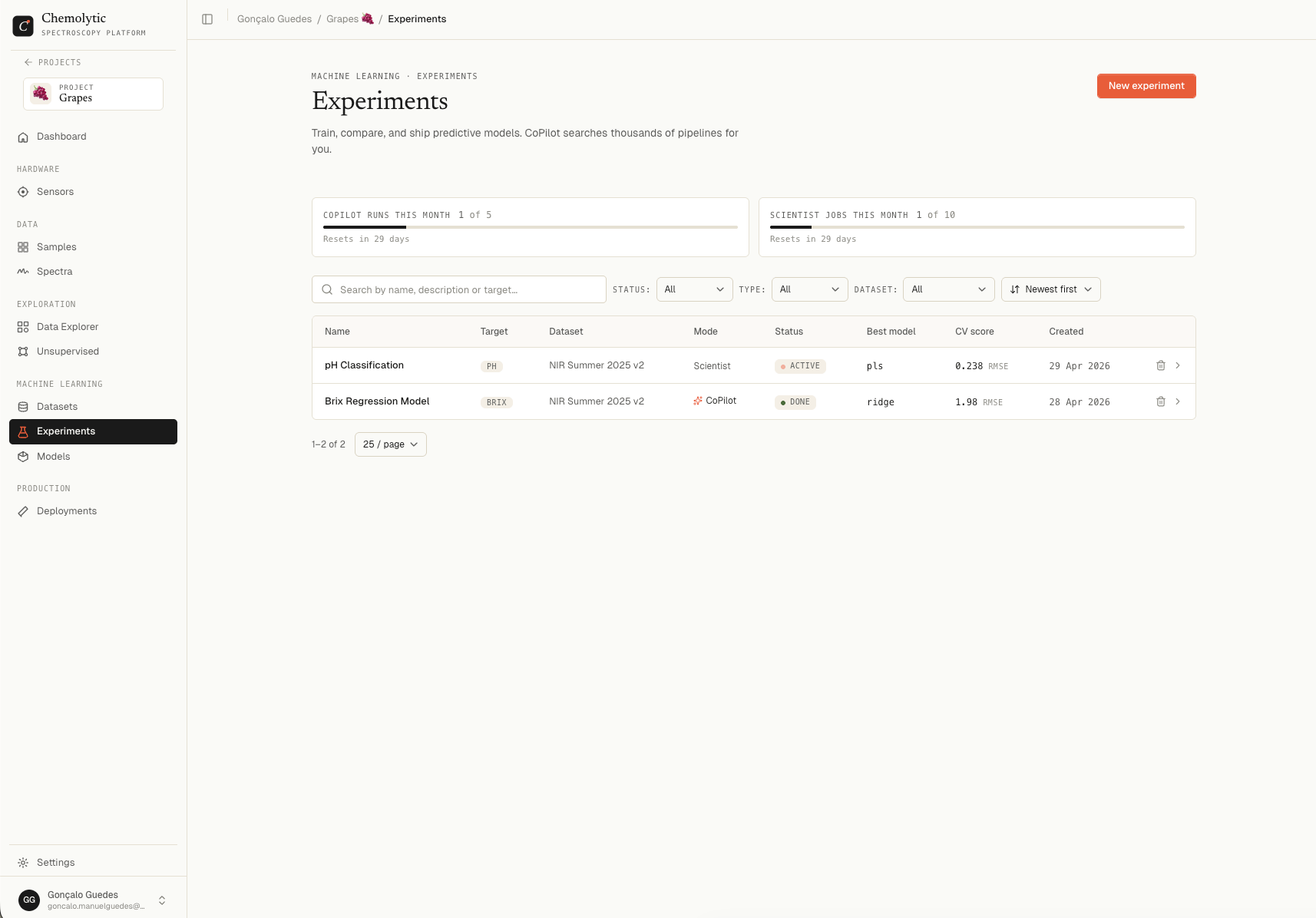
| Column | Description |
|---|
| Name | Experiment name and optional description |
| Target | The property being predicted |
| Dataset | Dataset name and version |
| Mode | CoPilot or Scientist |
| Status | Pending, Running, Done, Failed, or Active (Scientist only) |
| Best model | Algorithm name of the current best trial (e.g., PLS, Ridge, RF) |
| CV score | Best trial’s primary cross-validation metric (RMSE for regression, F1 macro for classification) |
| Created | Date created |
Filters
| Filter | Options |
|---|
| Status | All / Pending / Running / Done / Failed |
| Type | All / Regression / Classification |
| Dataset | All datasets, or a specific one |
| Search | Filters by name, description, or target property |
The list polls every 3 seconds when any experiment is running, so progress updates live.
Status badges
| Status | What it means |
|---|
| Pending (amber) | Queued, training has not started yet |
| Running (flame, pulsing) | Training in progress |
| Done (green) | All work finished, best trial selected |
| Failed (red) | Training failed; see the error on the detail page |
| Active (flame, pulsing) | Scientist experiment is open and ready to accept new jobs |
Plan limits
Two monthly quotas, shown at the top of the Experiments page:
| Quota | What it counts |
|---|
| CoPilot runs this month | Each CoPilot experiment = 1 run |
| Scientist jobs this month | Each job you submit in a Scientist experiment = 1 |
Both reset at the start of your billing period. The widget shows when the next reset happens.
If you hit a quota mid-month, you can still browse and inspect existing experiments; only creating new ones is blocked.
Deleting an experiment
Click the trash icon on a row, or the Delete action in the detail page.
Deleting an experiment removes all its jobs and trials permanently. Models that were registered from those trials still work (they have their own copies), but the trial details cannot be recovered.
What’s next