

What CoPilot does
Behind the scenes, CoPilot:- Reads your dataset (sample count, property type, value distribution)
- Picks a cross-validation strategy based on dataset size (5-fold, 10-fold, or leave-one-out)
- Allows a model pool based on the problem (PLS, Ridge, KNN, SVR, RF for regression; PLS-DA, Logistic, KNN, SVM, RF for classification)
- Searches preprocessing pipelines across scatter correction, derivatives, smoothing, and scaling
- Optimizes hyperparameters
- Runs 1000-3000 trials until the search converges
- Selects the best trial by primary metric (RMSE for regression, F1 macro for classification) and complexity
Following progress
While CoPilot runs, the experiment status is Running and the detail page polls every 3 seconds. You can leave the page and come back; nothing is lost. You’ll see:- A progress indicator
- The “Trials” count rising as work completes
- Live updates to the leaderboard
Reading the result
The detail page leads with a Best trial hero section showing the winning model.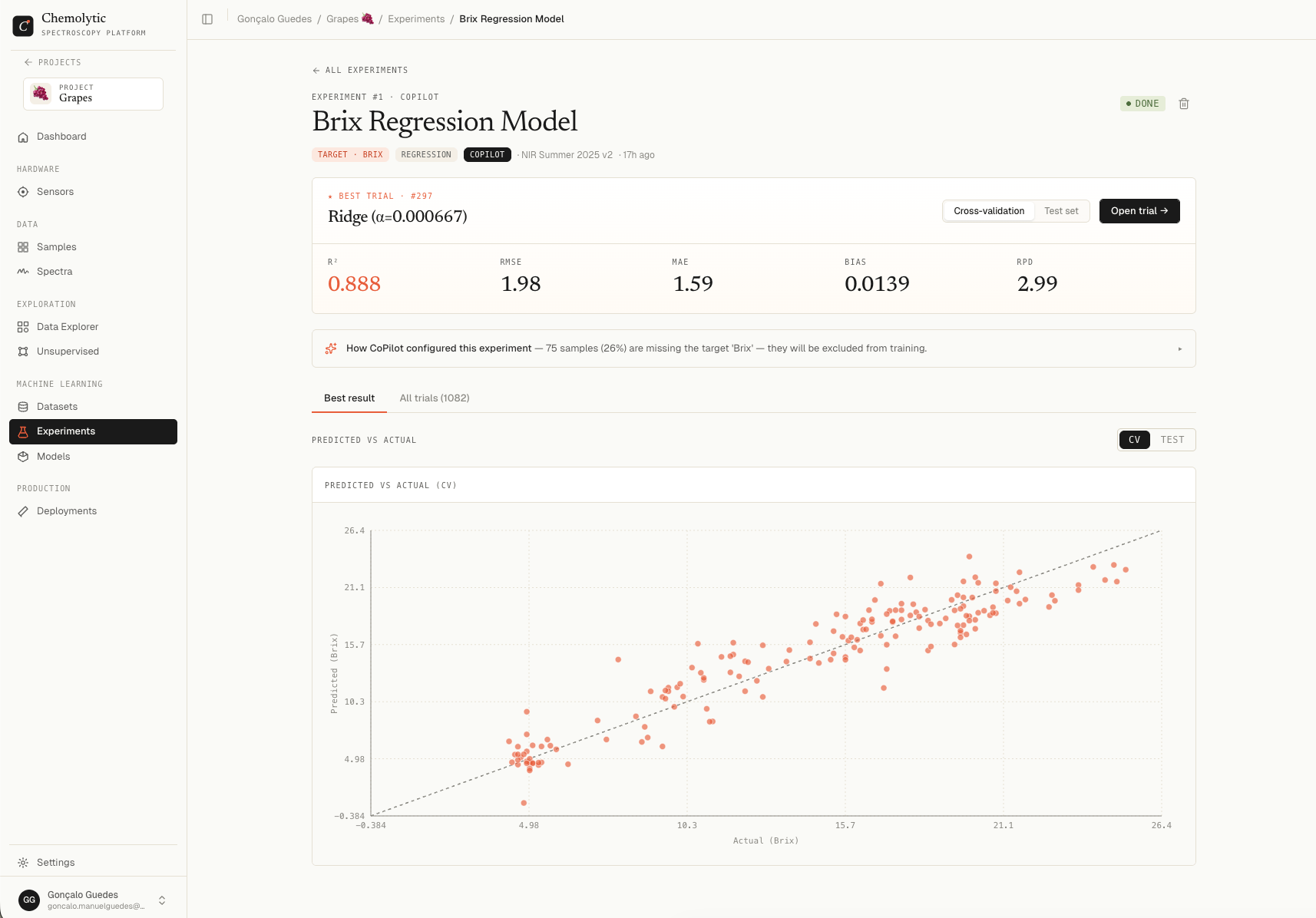
Toggle: CV vs Test
Two buttons let you switch between cross-validation and held-out test metrics.
In CoPilot, both are computed automatically. Use CV to pick a model and Test to confirm it didn’t overfit.
Regression metrics
Classification metrics
CoPilot’s reasoning
Click How CoPilot configured this experiment to expand a list of decisions CoPilot made and why. Examples of what you’ll see:- “Using Venetian Blinds 5-fold CV (30-100 samples)”
- “Allowed models: PLS, Ridge, KNN”
- “Target type continuous → regression mode”
- “Excluded RF and SVM (too few samples)”
Tabs
After CoPilot finishes, two tabs appear:
The leaderboard is useful for understanding:
- How wide the metric range is across trials (is the result robust or fragile?)
- Which preprocessing kept showing up in top trials
- Which models did poorly
When CoPilot fails
Status: Failed. The detail page shows an error banner. Common causes:What CoPilot can’t do
- Switch problem types: continuous targets are always regression, categorical always classification
- Combine targets: predict only one property at a time
- Use external features: only the spectra and target property are used
- Custom preprocessing: only the catalog of supported methods is searched
After CoPilot finishes
Two main paths:
CoPilot is a starting point, not the end of the workflow. The leaderboard and explanation tell you what worked. Use that knowledge.