> ## Documentation Index
> Fetch the complete documentation index at: https://docs.chemolytic.com/llms.txt
> Use this file to discover all available pages before exploring further.
# Registered models
> Promote a trial to a permanent, deployable model. Track versions, performance, and lineage.
A registered model is a trained model snapshot promoted from an experiment trial. Once registered, a model is permanent: it can be deployed, downloaded, and versioned, independent of the experiment that produced it.
## Concept
When you click **Register Model** on a successful trial, three things happen:
1. The trial's pipeline (preprocessing + algorithm + hyperparameters) is captured
2. The model is **refit on the full training set** (no CV split) for production-quality predictions
3. A version is created, pinned to the dataset that was used for training
This means models are reproducible, auditable, and stable. Even if the source experiment is later deleted or the dataset version changes, the model retains everything it needs to make predictions.
## Models page
Go to **Models** in the project sidebar.
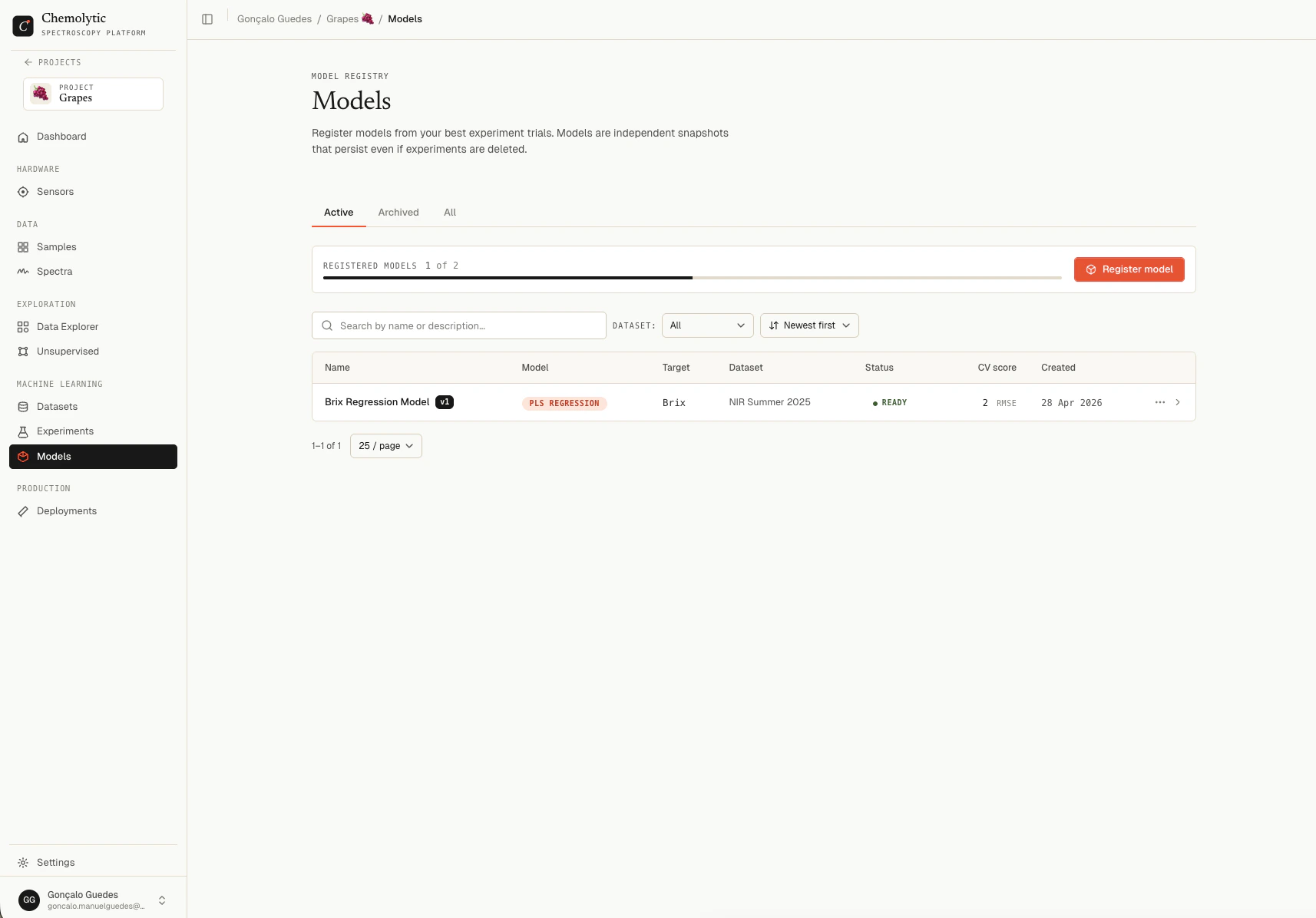 | Column | Description |
| ------------ | ----------------------------------------------------------------- |
| **Name** | Model name and version badge (e.g., `Brix Predictor v3`) |
| **Model** | Algorithm type (PLS, Ridge, RF, etc.) |
| **Target** | Property the model predicts |
| **Dataset** | Pinned dataset used for training |
| **Status** | Building (pulsing), Ready, or Failed |
| **CV score** | Primary metric (RMSE for regression, F1 macro for classification) |
| **Created** | Date registered |
### Tabs
| Tab | Shows |
| ------------ | -------------------------------------- |
| **Active** | Models in normal use (default) |
| **Archived** | Archived models, hidden from main list |
| **All** | Both |
The page polls every 3 seconds while any model has status **Building** so progress updates live.
## Status flow
```mermaid theme={null}
flowchart LR
A[Register Model] --> B[Building]
B --> C[Ready]
B --> D[Failed]
```
| Status | Meaning |
| ------------ | --------------------------------------------------------------- |
| **Building** | Model is being refit on the full training set in the background |
| **Ready** | Refit complete, model is deployable |
| **Failed** | Refit failed; see the error on the detail page |
Building usually takes 10 seconds to a few minutes depending on dataset size and algorithm.
## Model detail
Click any model in the list to open its detail page.
| Column | Description |
| ------------ | ----------------------------------------------------------------- |
| **Name** | Model name and version badge (e.g., `Brix Predictor v3`) |
| **Model** | Algorithm type (PLS, Ridge, RF, etc.) |
| **Target** | Property the model predicts |
| **Dataset** | Pinned dataset used for training |
| **Status** | Building (pulsing), Ready, or Failed |
| **CV score** | Primary metric (RMSE for regression, F1 macro for classification) |
| **Created** | Date registered |
### Tabs
| Tab | Shows |
| ------------ | -------------------------------------- |
| **Active** | Models in normal use (default) |
| **Archived** | Archived models, hidden from main list |
| **All** | Both |
The page polls every 3 seconds while any model has status **Building** so progress updates live.
## Status flow
```mermaid theme={null}
flowchart LR
A[Register Model] --> B[Building]
B --> C[Ready]
B --> D[Failed]
```
| Status | Meaning |
| ------------ | --------------------------------------------------------------- |
| **Building** | Model is being refit on the full training set in the background |
| **Ready** | Refit complete, model is deployable |
| **Failed** | Refit failed; see the error on the detail page |
Building usually takes 10 seconds to a few minutes depending on dataset size and algorithm.
## Model detail
Click any model in the list to open its detail page.
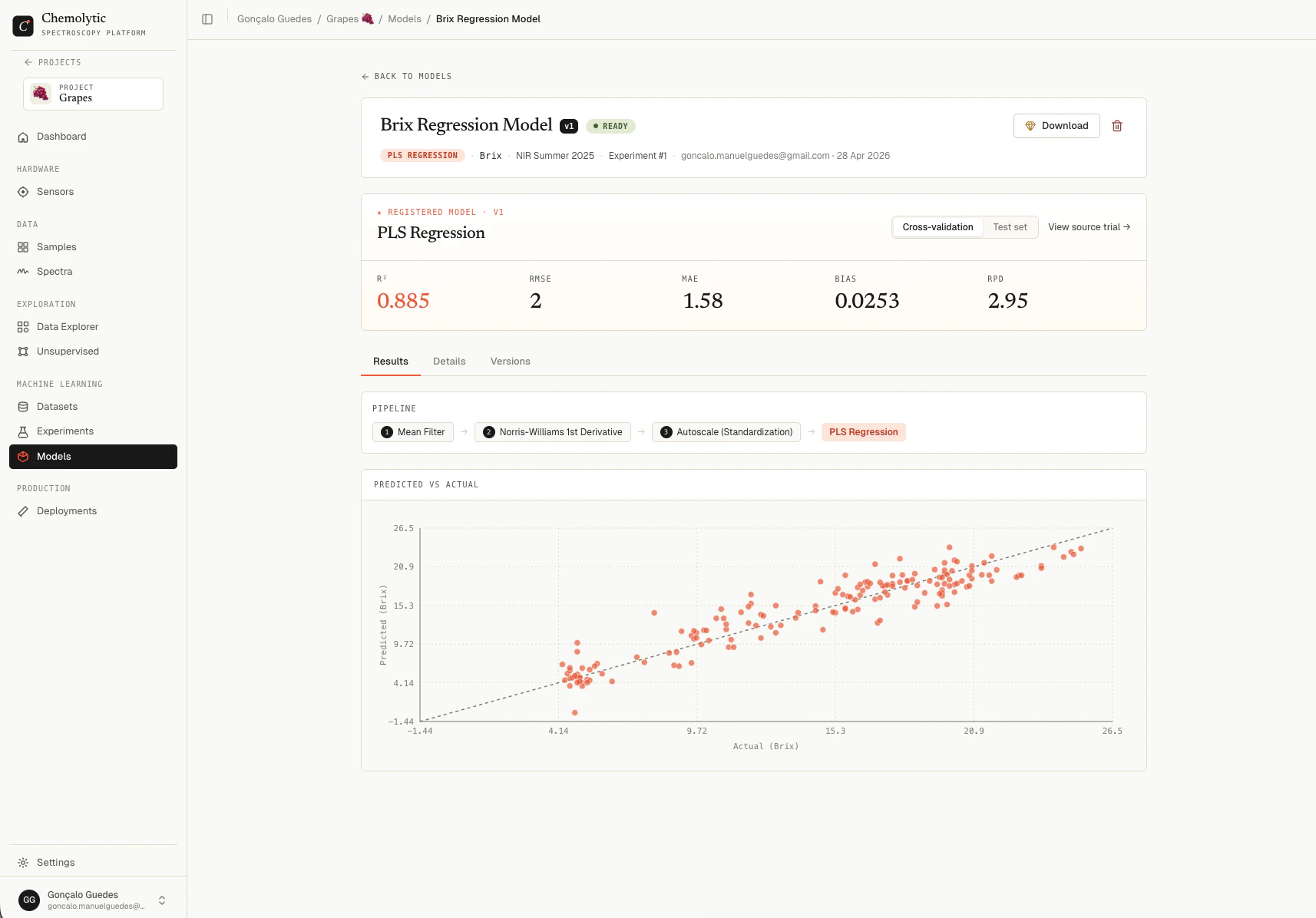 ### Header
Shows the model name, version badge, status, description, and metadata: algorithm, target property, source dataset, and source experiment/trial (clickable links to the original).
### Performance hero
A metric grid showing the model's performance, with a CV/Test toggle.
The metrics shown are the same as in the trial detail (R², RMSE, MAE, Bias, RPD for regression; Accuracy, F1, Precision, Recall for classification). See [Trial results](/modelling/trial-results) for how to read each.
These numbers come from the **original trial's** CV and test split, not from the refit. The refit just trains on more data; the metrics reported here represent how the model is expected to perform on new spectra.
### Tabs
| Tab | Contents |
| ------------ | ---------------------------------------------------------------------------------------------------------------- |
| **Results** | Pipeline visualization, predicted vs actual chart (regression), or confusion matrix (classification) |
| **Details** | Exact hyperparameters, preprocessing parameters, and traceability info (source experiment, trial, artifact path) |
| **Versions** | Every version of this model, sortable, with current version highlighted |
## Downloading a model
If your plan allows it, click **Download** to get a `.joblib` file containing the trained model.
Model download requires the **`allow_model_download`** plan feature. If your plan doesn't include it, the Download button shows a gem icon and clicking it opens an upgrade dialog instead.
The file is named `{model_name}_v{version}.joblib` and contains the full trained scikit-learn pipeline. You can load it with:
```python theme={null}
import joblib
model = joblib.load("Brix_Predictor_v3.joblib")
predictions = model.predict(X) # X is shape (n_samples, n_features)
```
This is useful for:
* Offline predictions in air-gapped environments
* Integrating into custom Python workflows
* Auditing the model architecture
A dedicated Python SDK is planned. It will package the model with full metadata (sensor, dataset version, expected x-axis, target property, units) so you don't have to track these separately. For now, the raw `.joblib` file contains only the fitted scikit-learn pipeline.
The downloaded model expects spectra with the **exact same x-axis** as the sensor used to train it. Predictions on spectra from a different sensor will fail or produce nonsense.
## Lineage and reproducibility
Every registered model includes:
* A link to the **source experiment** (or "Deleted" if removed)
* A link to the **source trial** (or "Deleted" if removed)
* The pinned **dataset** it was trained on (immutable)
* The exact **pipeline** and **hyperparameters**
This lineage ensures you can always trace any prediction back to the data and configuration that produced the model. Even if the experiment is deleted later, the model itself stays intact.
## Editing a model
You can rename a model and update its description from the detail page. The pipeline, dataset, and metrics are immutable.
## Deleting a model
You cannot delete a model that has active deployments. Remove its deployments first. The error: "Cannot delete model with active deployments. Remove all deployments first."
Click the trash icon on the detail page, confirm in the dialog, and the model and its artifacts are permanently removed.
## Plan limits
Your plan limits how many registered models you can have per project (`max_registered_models`). The current count and limit appear at the top of the Models page.
### Header
Shows the model name, version badge, status, description, and metadata: algorithm, target property, source dataset, and source experiment/trial (clickable links to the original).
### Performance hero
A metric grid showing the model's performance, with a CV/Test toggle.
The metrics shown are the same as in the trial detail (R², RMSE, MAE, Bias, RPD for regression; Accuracy, F1, Precision, Recall for classification). See [Trial results](/modelling/trial-results) for how to read each.
These numbers come from the **original trial's** CV and test split, not from the refit. The refit just trains on more data; the metrics reported here represent how the model is expected to perform on new spectra.
### Tabs
| Tab | Contents |
| ------------ | ---------------------------------------------------------------------------------------------------------------- |
| **Results** | Pipeline visualization, predicted vs actual chart (regression), or confusion matrix (classification) |
| **Details** | Exact hyperparameters, preprocessing parameters, and traceability info (source experiment, trial, artifact path) |
| **Versions** | Every version of this model, sortable, with current version highlighted |
## Downloading a model
If your plan allows it, click **Download** to get a `.joblib` file containing the trained model.
Model download requires the **`allow_model_download`** plan feature. If your plan doesn't include it, the Download button shows a gem icon and clicking it opens an upgrade dialog instead.
The file is named `{model_name}_v{version}.joblib` and contains the full trained scikit-learn pipeline. You can load it with:
```python theme={null}
import joblib
model = joblib.load("Brix_Predictor_v3.joblib")
predictions = model.predict(X) # X is shape (n_samples, n_features)
```
This is useful for:
* Offline predictions in air-gapped environments
* Integrating into custom Python workflows
* Auditing the model architecture
A dedicated Python SDK is planned. It will package the model with full metadata (sensor, dataset version, expected x-axis, target property, units) so you don't have to track these separately. For now, the raw `.joblib` file contains only the fitted scikit-learn pipeline.
The downloaded model expects spectra with the **exact same x-axis** as the sensor used to train it. Predictions on spectra from a different sensor will fail or produce nonsense.
## Lineage and reproducibility
Every registered model includes:
* A link to the **source experiment** (or "Deleted" if removed)
* A link to the **source trial** (or "Deleted" if removed)
* The pinned **dataset** it was trained on (immutable)
* The exact **pipeline** and **hyperparameters**
This lineage ensures you can always trace any prediction back to the data and configuration that produced the model. Even if the experiment is deleted later, the model itself stays intact.
## Editing a model
You can rename a model and update its description from the detail page. The pipeline, dataset, and metrics are immutable.
## Deleting a model
You cannot delete a model that has active deployments. Remove its deployments first. The error: "Cannot delete model with active deployments. Remove all deployments first."
Click the trash icon on the detail page, confirm in the dialog, and the model and its artifacts are permanently removed.
## Plan limits
Your plan limits how many registered models you can have per project (`max_registered_models`). The current count and limit appear at the top of the Models page.