> ## Documentation Index
> Fetch the complete documentation index at: https://docs.chemolytic.com/llms.txt
> Use this file to discover all available pages before exploring further.
# Deployments
> Make a registered model available for live predictions, via the web interface or API.
A deployment wraps a registered model and exposes it for predictions. Until a model is deployed, you can only inspect its metrics. Once deployed, you can send new spectra and get predictions back, either through the web UI or programmatically via the API.
## Concept
A deployment is a thin layer:
* **Pointer to a model**: each deployment points to one registered model + version
* **Active flag**: deployments can be toggled active or inactive without being deleted
* **Quota tracker**: prediction usage is metered per deployment per month
You can have many deployments per model (e.g., one for production, one for staging) but each deployment points to exactly one model version.
## Deployments page
Go to **Deployments** in the project sidebar.
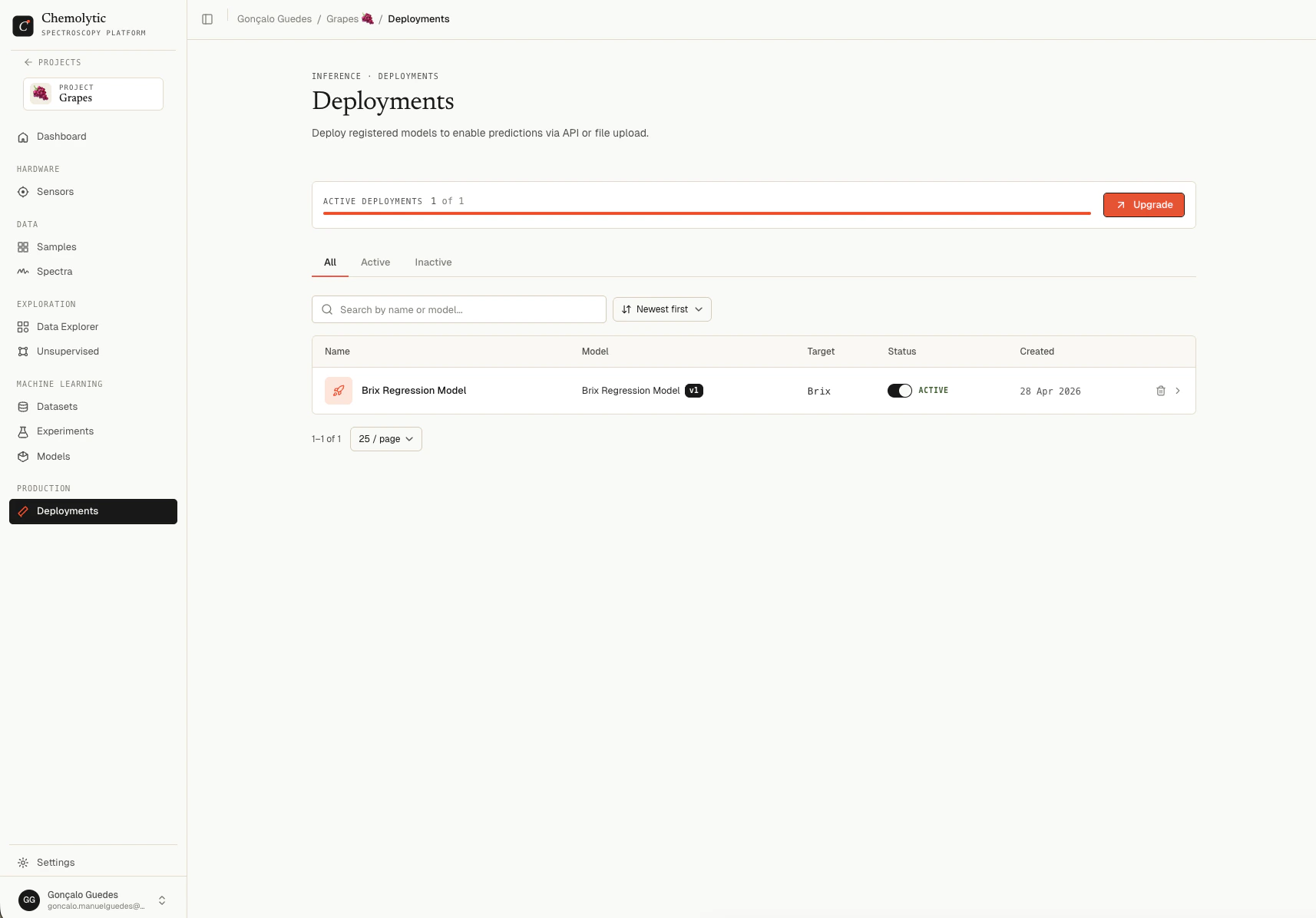 | Column | Description |
| ----------- | ---------------------------------------------------- |
| **Name** | Deployment name and optional description |
| **Model** | Linked model and version (e.g., `Brix Predictor v3`) |
| **Target** | Property being predicted |
| **Status** | Toggle switch: Active or Inactive |
| **Created** | Date created |
### Tabs
| Tab | Shows |
| ------------ | ------------------------- |
| **All** | Every deployment |
| **Active** | Only active deployments |
| **Inactive** | Only inactive deployments |
## Creating a deployment
Click **New deployment** to open the create dialog.
| Column | Description |
| ----------- | ---------------------------------------------------- |
| **Name** | Deployment name and optional description |
| **Model** | Linked model and version (e.g., `Brix Predictor v3`) |
| **Target** | Property being predicted |
| **Status** | Toggle switch: Active or Inactive |
| **Created** | Date created |
### Tabs
| Tab | Shows |
| ------------ | ------------------------- |
| **All** | Every deployment |
| **Active** | Only active deployments |
| **Inactive** | Only inactive deployments |
## Creating a deployment
Click **New deployment** to open the create dialog.
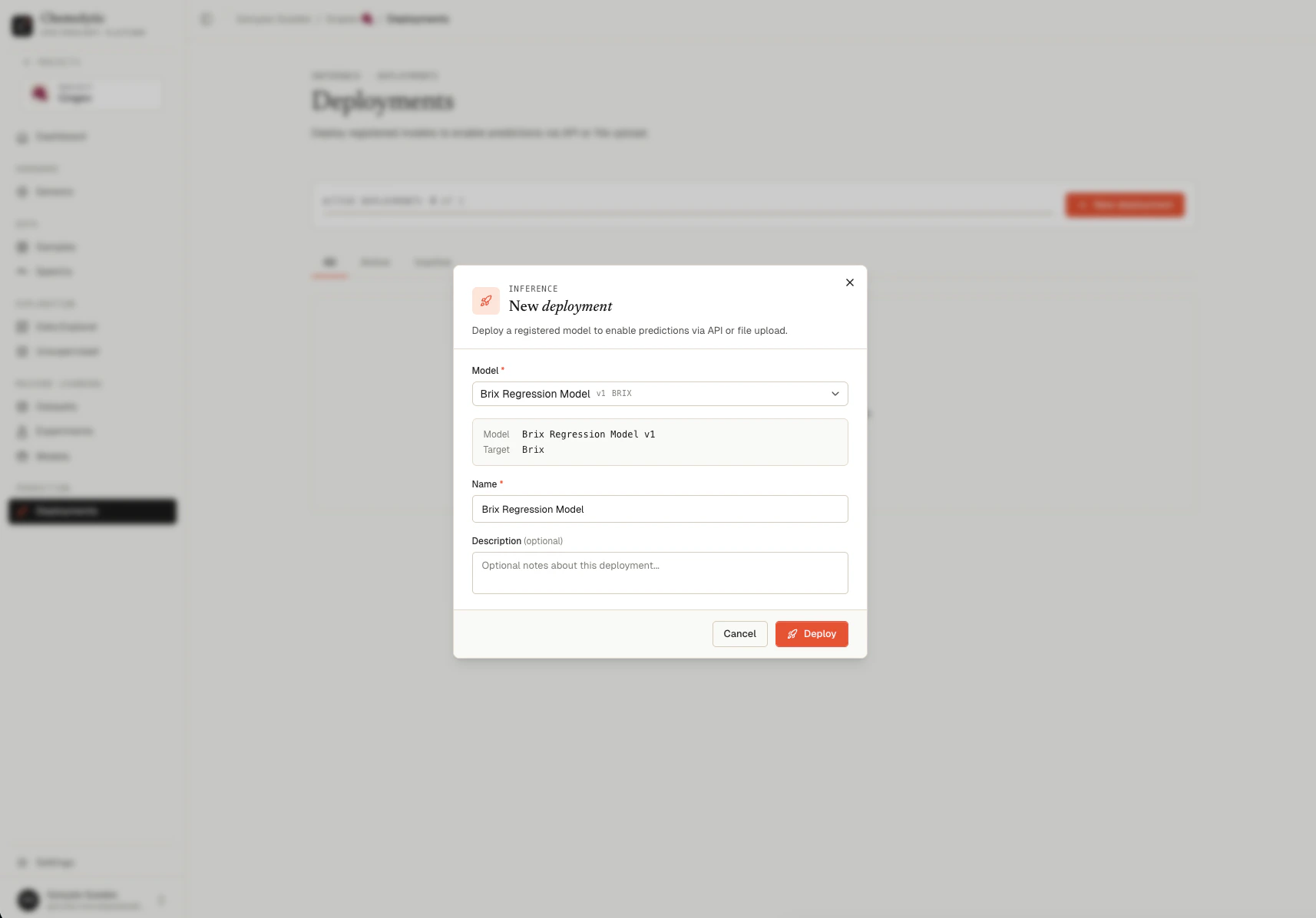 | Field | Required | Notes |
| --------------- | -------- | ------------------------------------------------ |
| **Model** | Yes | Pick from registered models with status Ready |
| **Name** | Yes | Auto-fills from the model name; you can override |
| **Description** | No | Free-text |
When you select a model, a preview appears showing the model name, version, and target property.
Click **Deploy**. The deployment is created in **Active** state by default.
### Validation errors
Each model version can have at most one deployment at a time. Either deactivate the existing one or pick a different model version.
The model is still building or failed to build. Wait for status Ready before deploying.
Your plan limits how many active deployments you can have. Deactivate one to free up the slot, or upgrade.
## Active vs inactive
Toggle the switch on a deployment row to activate or deactivate it.
| State | Behavior |
| ------------ | ----------------------------------------------------- |
| **Active** | Predictions allowed via web UI and API |
| **Inactive** | Predictions return error: "Deployment is not active." |
Toggle off to pause predictions without losing the deployment configuration. API keys, prediction logs, and usage history are preserved.
Activating a deployment counts against your plan's `max_active_deployments` limit. If the limit is reached, the toggle is disabled until you deactivate another deployment or upgrade.
## Deployment detail
Click a deployment row to open its detail page.
| Field | Required | Notes |
| --------------- | -------- | ------------------------------------------------ |
| **Model** | Yes | Pick from registered models with status Ready |
| **Name** | Yes | Auto-fills from the model name; you can override |
| **Description** | No | Free-text |
When you select a model, a preview appears showing the model name, version, and target property.
Click **Deploy**. The deployment is created in **Active** state by default.
### Validation errors
Each model version can have at most one deployment at a time. Either deactivate the existing one or pick a different model version.
The model is still building or failed to build. Wait for status Ready before deploying.
Your plan limits how many active deployments you can have. Deactivate one to free up the slot, or upgrade.
## Active vs inactive
Toggle the switch on a deployment row to activate or deactivate it.
| State | Behavior |
| ------------ | ----------------------------------------------------- |
| **Active** | Predictions allowed via web UI and API |
| **Inactive** | Predictions return error: "Deployment is not active." |
Toggle off to pause predictions without losing the deployment configuration. API keys, prediction logs, and usage history are preserved.
Activating a deployment counts against your plan's `max_active_deployments` limit. If the limit is reached, the toggle is disabled until you deactivate another deployment or upgrade.
## Deployment detail
Click a deployment row to open its detail page.
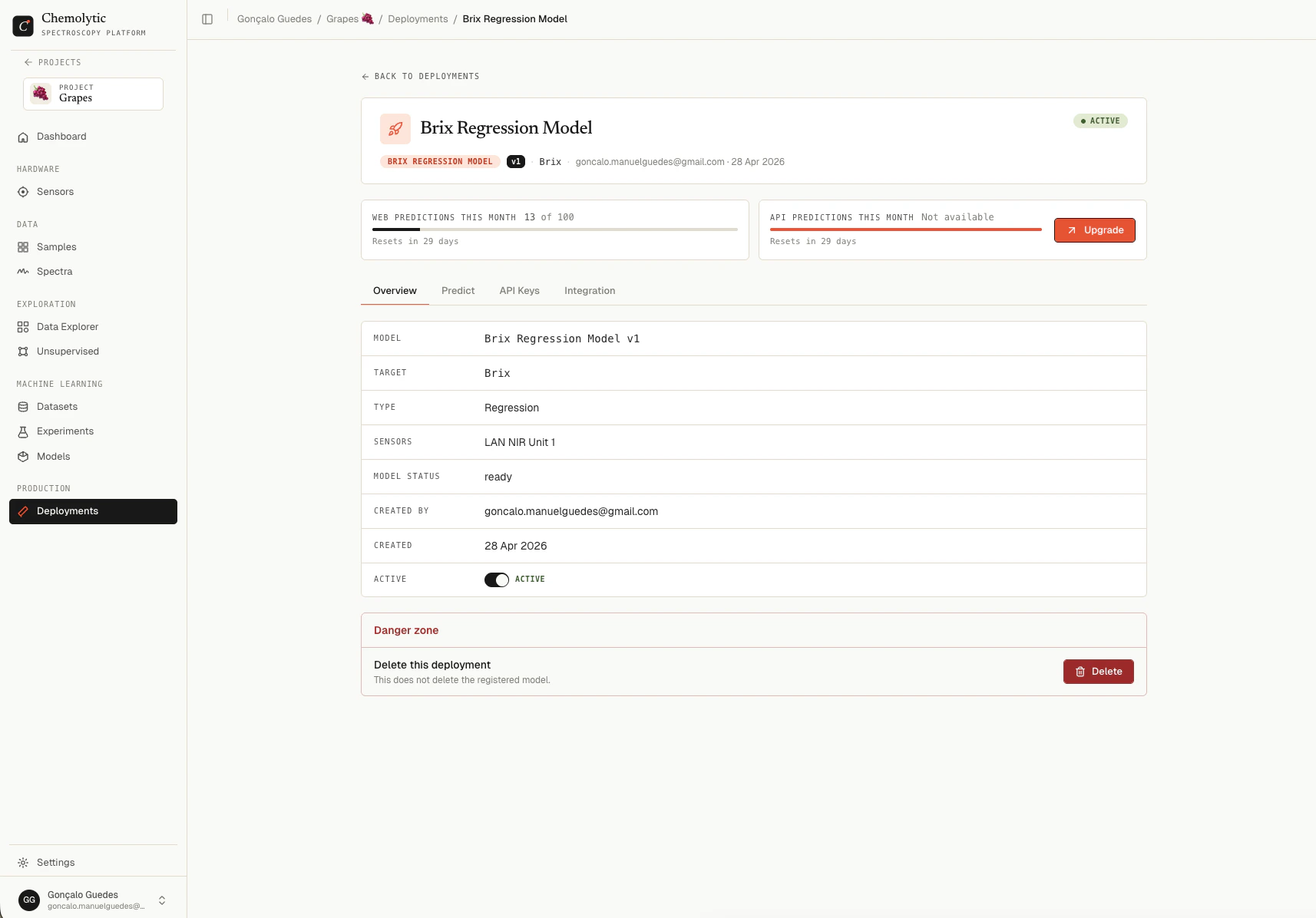 ### Usage quotas
Two cards at the top showing this month's prediction usage:
| Quota | What it counts |
| ------------------------------ | ----------------------------------------- |
| **Web predictions this month** | Predictions submitted via the Predict tab |
| **API predictions this month** | Predictions submitted via the API |
Each card shows used / limit and the date when the quota resets.
### Tabs
| Tab | Purpose |
| --------------- | ------------------------------------------------------------- |
| **Overview** | Metadata table, active toggle, danger zone with delete button |
| **Predict** | Web UI for uploading spectra and getting predictions back |
| **API Keys** | Manage keys for programmatic access |
| **Integration** | Code samples (Python, JavaScript, cURL) for calling the API |
See dedicated pages for [Web predictions](/production/predictions-web), [API predictions](/production/predictions-api), and [API keys](/production/api-keys).
## Deleting a deployment
In the Overview tab, scroll to the danger zone and click **Delete**.
Deleting a deployment is permanent. All linked **API keys are revoked** automatically. Prediction logs are kept for the 90-day retention window. The underlying registered model is **not** deleted.
A confirmation dialog asks before anything is removed.
## Plan limits
Your plan limits:
| Limit | Description |
| ---------------------------------- | ------------------------------------------------------------- |
| **`max_active_deployments`** | Total number of deployments that can be active simultaneously |
| **`max_webapp_predictions_month`** | Web UI predictions allowed per month |
| **`max_api_predictions_month`** | API predictions allowed per month |
| **`allow_api_predict`** | Whether the API endpoint is callable at all (Pro and above) |
Quotas reset at the start of each billing period.
## Tips
**Use one deployment per use case.** A deployment is a stable contract: API keys, integration code, and usage history all hang off it. Don't reuse one deployment for multiple workflows; create separate ones.
**Deactivate when not in use.** If you've reached your active deployment limit but still want to keep older deployments around for reference or quick reactivation, deactivate them instead of deleting.
### Usage quotas
Two cards at the top showing this month's prediction usage:
| Quota | What it counts |
| ------------------------------ | ----------------------------------------- |
| **Web predictions this month** | Predictions submitted via the Predict tab |
| **API predictions this month** | Predictions submitted via the API |
Each card shows used / limit and the date when the quota resets.
### Tabs
| Tab | Purpose |
| --------------- | ------------------------------------------------------------- |
| **Overview** | Metadata table, active toggle, danger zone with delete button |
| **Predict** | Web UI for uploading spectra and getting predictions back |
| **API Keys** | Manage keys for programmatic access |
| **Integration** | Code samples (Python, JavaScript, cURL) for calling the API |
See dedicated pages for [Web predictions](/production/predictions-web), [API predictions](/production/predictions-api), and [API keys](/production/api-keys).
## Deleting a deployment
In the Overview tab, scroll to the danger zone and click **Delete**.
Deleting a deployment is permanent. All linked **API keys are revoked** automatically. Prediction logs are kept for the 90-day retention window. The underlying registered model is **not** deleted.
A confirmation dialog asks before anything is removed.
## Plan limits
Your plan limits:
| Limit | Description |
| ---------------------------------- | ------------------------------------------------------------- |
| **`max_active_deployments`** | Total number of deployments that can be active simultaneously |
| **`max_webapp_predictions_month`** | Web UI predictions allowed per month |
| **`max_api_predictions_month`** | API predictions allowed per month |
| **`allow_api_predict`** | Whether the API endpoint is callable at all (Pro and above) |
Quotas reset at the start of each billing period.
## Tips
**Use one deployment per use case.** A deployment is a stable contract: API keys, integration code, and usage history all hang off it. Don't reuse one deployment for multiple workflows; create separate ones.
**Deactivate when not in use.** If you've reached your active deployment limit but still want to keep older deployments around for reference or quick reactivation, deactivate them instead of deleting.