> ## Documentation Index
> Fetch the complete documentation index at: https://docs.chemolytic.com/llms.txt
> Use this file to discover all available pages before exploring further.
# Datasets
> What datasets are, why they are immutable, and when to create one.
A dataset is a **frozen snapshot** of your spectra and sample properties at a single point in time. It's the input to every experiment in Chemolytic.
Once created, a dataset never changes. Even if you upload more spectra, edit sample properties, or archive measurements, the existing dataset keeps the exact data it was created with.
## Why datasets are immutable
Reproducibility is the reason. A model is only meaningful if you know exactly what data it was trained on.
If datasets could change after creation:
* Re-running an experiment could produce different results without explanation
* Comparing two models trained "on the same dataset" would be unreliable
* Auditing a deployed model's training data would be impossible
By freezing the snapshot, Chemolytic guarantees that every experiment, every model, and every prediction can always be traced back to the exact input data.
## What a dataset contains
When you create a dataset, Chemolytic captures:
* **All active spectra** for the chosen sensor (archived spectra are excluded)
* The **samples** linked to those spectra
* The **property values** for those samples
* A **manifest**: a table mapping every spectrum to its sample and property values
* The **sensor metadata** (name, model, units, x-axis range, calibration)
* **Property statistics** (mean, std, min, max for continuous; category counts for categorical)
This snapshot is saved as a compressed numerical file (`.npz`) plus a manifest in the database.
Datasets are tied to **one sensor**. To train a model that works across multiple sensors, you currently need separate datasets and separate models. Cross-sensor modelling is on our roadmap.
## Datasets page
Go to **Datasets** in the project sidebar to see all datasets in the project.
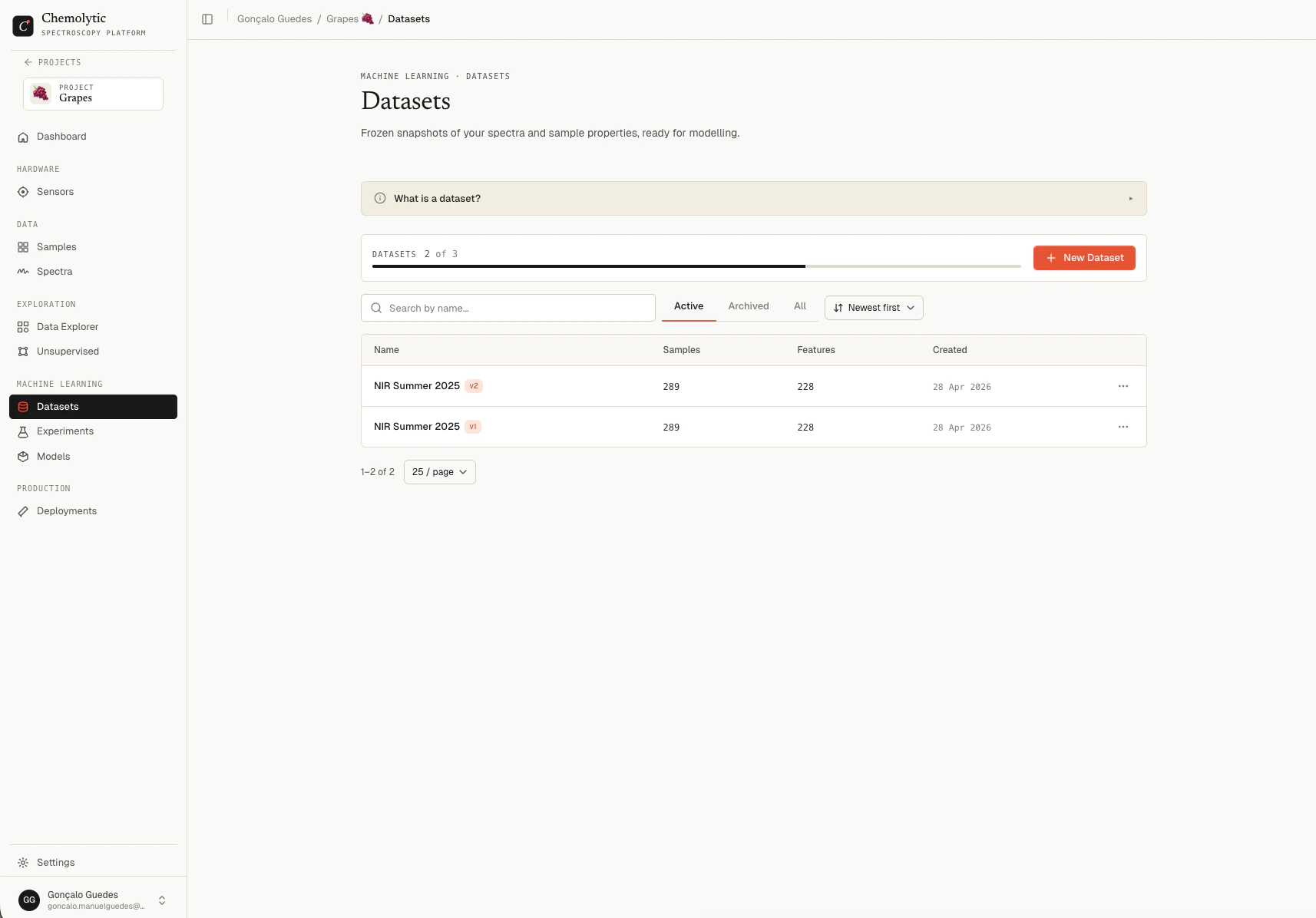 Each dataset shows:
| Column | Description |
| ------------ | ----------------------------------------------------------------------- |
| **Name** | Dataset name with a version badge (e.g., `v3`) and optional description |
| **Samples** | Number of spectra in the snapshot |
| **Features** | Number of data points per spectrum (defined by the sensor's x-axis) |
| **Created** | Date the snapshot was taken |
### Status tabs
| Tab | Shows |
| ------------ | ---------------------------------------- |
| **Active** | Datasets in normal use (default) |
| **Archived** | Archived datasets, hidden from main list |
| **All** | Both active and archived |
Use **Search** to filter by name. The plan's `max_datasets` limit is shown at the top.
## Active vs. archived datasets
Archive a dataset to remove it from the active workspace without deleting it:
* Archived datasets do not appear in the experiment creation dialog
* Archived datasets still count toward your plan's dataset limit
* Models trained on an archived dataset still work (the model has its own copy of what it needs)
* You can unarchive at any time from the Archived tab
Archive old dataset versions you no longer use to keep the active list clean. The historical record is preserved for audits.
## When to create a new dataset vs. a new version
| Situation | Create |
| --------------------------------------------------------------------- | ----------------------------------- |
| New project, first time bundling data for training | New dataset |
| Same sensor, but you've added or fixed samples since the last dataset | New version of the existing dataset |
| Different sensor (even on the same project) | New dataset |
| Different scope (e.g., just samples from one site) | New dataset |
See [Dataset versions](/modelling/dataset-versions) for how versioning works.
## What's next
* [Creating a dataset](/modelling/creating-a-dataset) for the create flow
* [Dataset detail](/modelling/dataset-detail) for inspecting a dataset
* [Dataset versions](/modelling/dataset-versions) for the versioning workflow
Each dataset shows:
| Column | Description |
| ------------ | ----------------------------------------------------------------------- |
| **Name** | Dataset name with a version badge (e.g., `v3`) and optional description |
| **Samples** | Number of spectra in the snapshot |
| **Features** | Number of data points per spectrum (defined by the sensor's x-axis) |
| **Created** | Date the snapshot was taken |
### Status tabs
| Tab | Shows |
| ------------ | ---------------------------------------- |
| **Active** | Datasets in normal use (default) |
| **Archived** | Archived datasets, hidden from main list |
| **All** | Both active and archived |
Use **Search** to filter by name. The plan's `max_datasets` limit is shown at the top.
## Active vs. archived datasets
Archive a dataset to remove it from the active workspace without deleting it:
* Archived datasets do not appear in the experiment creation dialog
* Archived datasets still count toward your plan's dataset limit
* Models trained on an archived dataset still work (the model has its own copy of what it needs)
* You can unarchive at any time from the Archived tab
Archive old dataset versions you no longer use to keep the active list clean. The historical record is preserved for audits.
## When to create a new dataset vs. a new version
| Situation | Create |
| --------------------------------------------------------------------- | ----------------------------------- |
| New project, first time bundling data for training | New dataset |
| Same sensor, but you've added or fixed samples since the last dataset | New version of the existing dataset |
| Different sensor (even on the same project) | New dataset |
| Different scope (e.g., just samples from one site) | New dataset |
See [Dataset versions](/modelling/dataset-versions) for how versioning works.
## What's next
* [Creating a dataset](/modelling/creating-a-dataset) for the create flow
* [Dataset detail](/modelling/dataset-detail) for inspecting a dataset
* [Dataset versions](/modelling/dataset-versions) for the versioning workflow