> ## Documentation Index
> Fetch the complete documentation index at: https://docs.chemolytic.com/llms.txt
> Use this file to discover all available pages before exploring further.
# Adding a sensor
> Register a spectrometer in your project, either from the catalog or as a custom instrument.
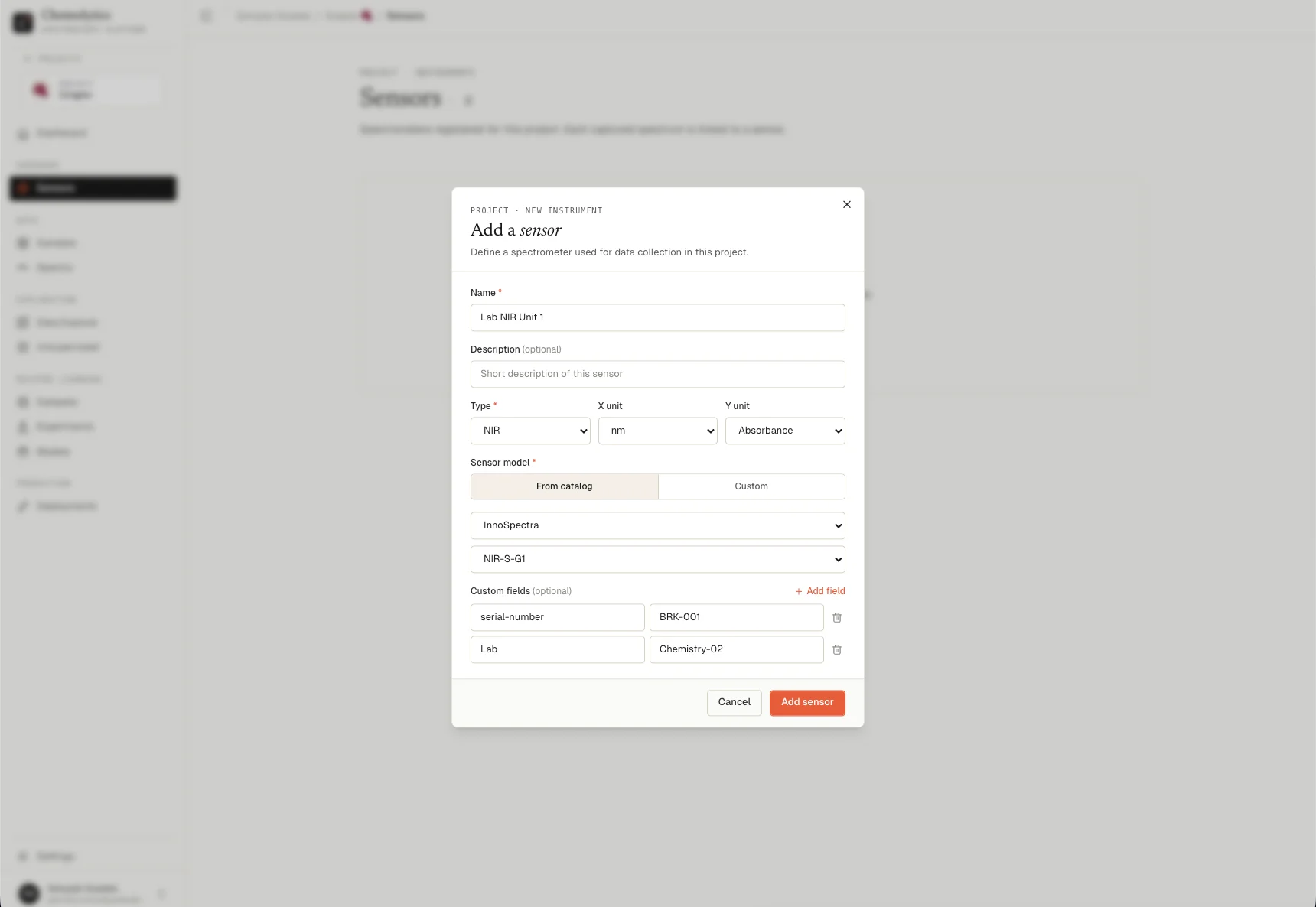
Click **Add sensor** on the Sensors page to open the sensor creation dialog.
 ## Fields
### Name
A label for this specific instrument in your lab. Use something that identifies it uniquely among your equipment (e.g., "Lab FTIR Unit A", "Warehouse NIR #2"). Required.
### Description
Optional notes: room location, setup configuration, who manages it. Shown in the sensor list as a subtitle.
### Type
The spectroscopy technique used by this instrument.
| Type | Full name | Common x unit |
| ---------- | -------------------------- | ------------- |
| **NIR** | Near-Infrared | nm |
| **FTIR** | Fourier-Transform Infrared | cm⁻¹ |
| **SWIR** | Short-Wave Infrared | nm or μm |
| **Raman** | Raman Spectroscopy | cm⁻¹ |
| **UV-Vis** | Ultraviolet-Visible | nm |
### X unit
The unit used for the wavelength/wavenumber axis of your spectra.
| Option | Meaning | Typical for |
| -------- | ----------- | ----------------- |
| **nm** | Nanometers | NIR, SWIR, UV-Vis |
| **cm⁻¹** | Wavenumbers | FTIR, Raman |
| **μm** | Micrometers | SWIR |
### Y unit
The unit used for the intensity axis of your spectra.
| Option | Meaning |
| ----------------- | --------------------------------------------- |
| **Absorbance** | Log(1/T) — most common for quantitative work |
| **Reflectance** | Ratio of reflected to incident light (0 to 1) |
| **Transmittance** | Fraction of light transmitted (%) |
| **Intensity** | Raw detector counts |
If you're not sure which Y unit your instrument outputs, check your instrument software or the header of your exported CSV file.
## Catalog vs. custom
### From catalog
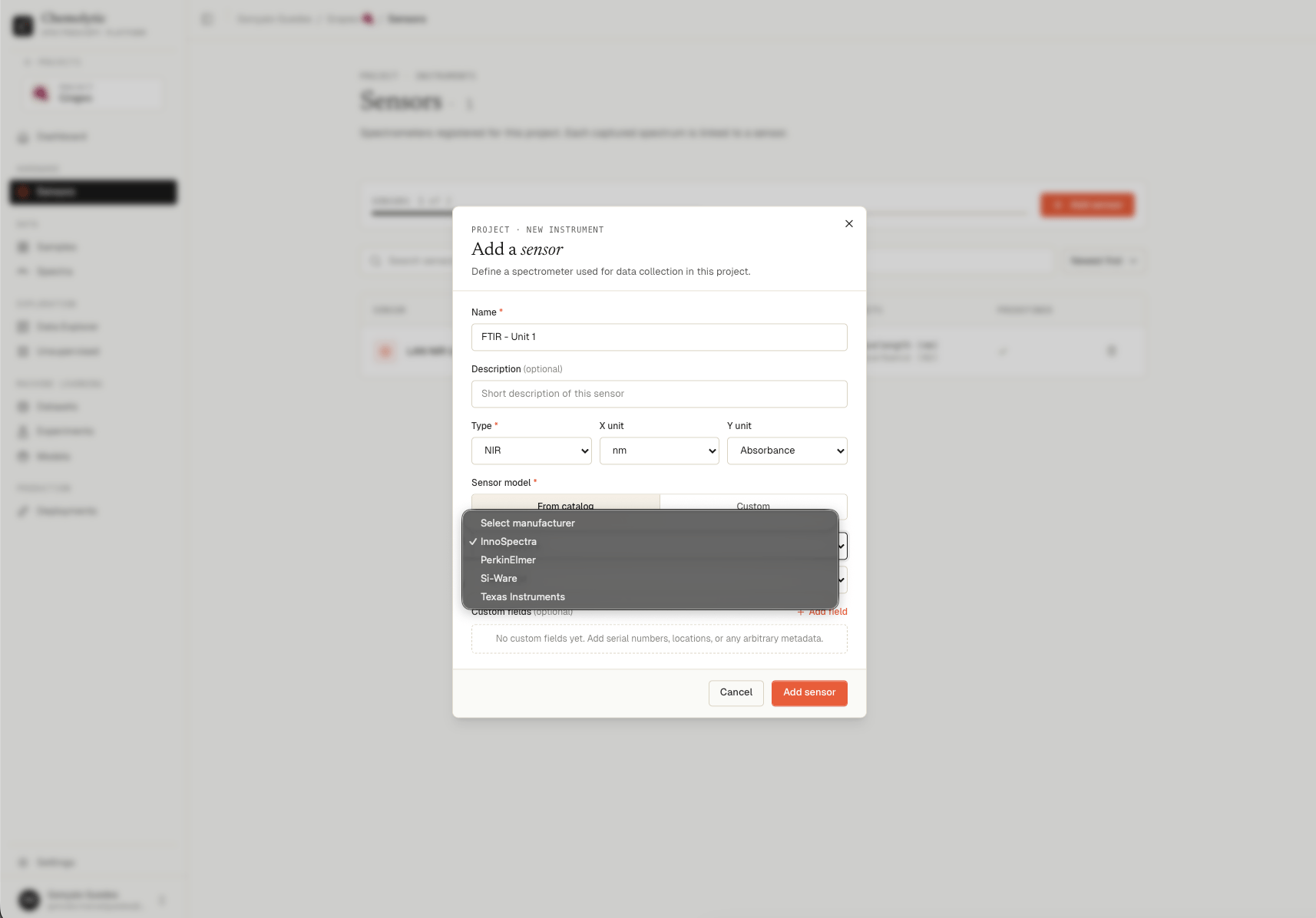
Catalog sensors have a **built-in importer**. When you upload spectra, Chemolytic knows the raw file format produced by that instrument and parses it automatically. No manual formatting needed.
Select your manufacturer first, then select your model from the filtered list. Type, units, and other fields are pre-filled.
## Fields
### Name
A label for this specific instrument in your lab. Use something that identifies it uniquely among your equipment (e.g., "Lab FTIR Unit A", "Warehouse NIR #2"). Required.
### Description
Optional notes: room location, setup configuration, who manages it. Shown in the sensor list as a subtitle.
### Type
The spectroscopy technique used by this instrument.
| Type | Full name | Common x unit |
| ---------- | -------------------------- | ------------- |
| **NIR** | Near-Infrared | nm |
| **FTIR** | Fourier-Transform Infrared | cm⁻¹ |
| **SWIR** | Short-Wave Infrared | nm or μm |
| **Raman** | Raman Spectroscopy | cm⁻¹ |
| **UV-Vis** | Ultraviolet-Visible | nm |
### X unit
The unit used for the wavelength/wavenumber axis of your spectra.
| Option | Meaning | Typical for |
| -------- | ----------- | ----------------- |
| **nm** | Nanometers | NIR, SWIR, UV-Vis |
| **cm⁻¹** | Wavenumbers | FTIR, Raman |
| **μm** | Micrometers | SWIR |
### Y unit
The unit used for the intensity axis of your spectra.
| Option | Meaning |
| ----------------- | --------------------------------------------- |
| **Absorbance** | Log(1/T) — most common for quantitative work |
| **Reflectance** | Ratio of reflected to incident light (0 to 1) |
| **Transmittance** | Fraction of light transmitted (%) |
| **Intensity** | Raw detector counts |
If you're not sure which Y unit your instrument outputs, check your instrument software or the header of your exported CSV file.
## Catalog vs. custom
### From catalog
Catalog sensors have a **built-in importer**. When you upload spectra, Chemolytic knows the raw file format produced by that instrument and parses it automatically. No manual formatting needed.
Select your manufacturer first, then select your model from the filtered list. Type, units, and other fields are pre-filled.
 ### Custom
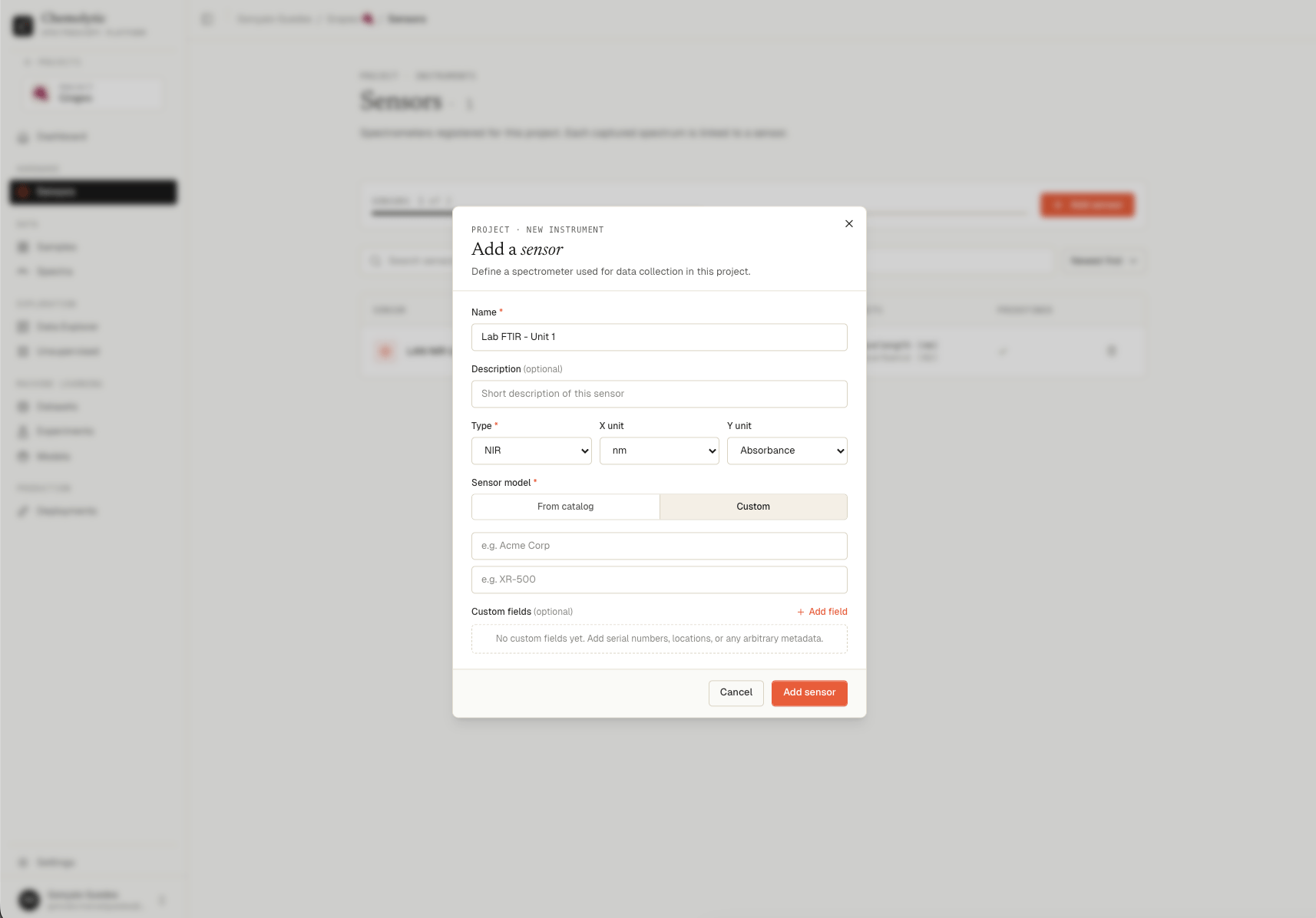
Custom sensors do not have a built-in importer. To upload spectra for a custom sensor, your files must follow the Chemolytic standard CSV format. See [Uploading spectra](/data/uploading-spectra) for the required format.
Switch to **Custom** and enter:
* **Manufacturer**: the company that made the instrument (e.g., "Acme Corp")
* **Model**: the instrument model name (e.g., "XR-500")
### Custom
Custom sensors do not have a built-in importer. To upload spectra for a custom sensor, your files must follow the Chemolytic standard CSV format. See [Uploading spectra](/data/uploading-spectra) for the required format.
Switch to **Custom** and enter:
* **Manufacturer**: the company that made the instrument (e.g., "Acme Corp")
* **Model**: the instrument model name (e.g., "XR-500")
 If your sensor is not in the catalog, contact us at **[support@chemolytic.com](mailto:support@chemolytic.com)** with the manufacturer name, model, and a few raw file examples from the instrument. We'll add a dedicated importer as quickly as possible.
## Custom fields
You can attach arbitrary metadata to a sensor as key-value pairs. Click **+ Add field** to add one.
Common uses:
| Key | Example value |
| ---------------- | -------------- |
| Serial number | BRK-2024-00142 |
| Firmware version | 3.4.1 |
| Resolution | 4 cm⁻¹ |
| Location | Lab 2, Bench B |
| Calibration date | 2026-01-15 |
Custom fields are visible in the sensor detail panel and are for your reference only. They do not affect data processing.
## After adding
Click **Add sensor**. The sensor appears in the list immediately. No spectra are linked yet. The x-axis calibration (point count and range) will be set automatically when you upload the first spectrum. See [Uploading spectra](/data/uploading-spectra) for the next step.
If your sensor is not in the catalog, contact us at **[support@chemolytic.com](mailto:support@chemolytic.com)** with the manufacturer name, model, and a few raw file examples from the instrument. We'll add a dedicated importer as quickly as possible.
## Custom fields
You can attach arbitrary metadata to a sensor as key-value pairs. Click **+ Add field** to add one.
Common uses:
| Key | Example value |
| ---------------- | -------------- |
| Serial number | BRK-2024-00142 |
| Firmware version | 3.4.1 |
| Resolution | 4 cm⁻¹ |
| Location | Lab 2, Bench B |
| Calibration date | 2026-01-15 |
Custom fields are visible in the sensor detail panel and are for your reference only. They do not affect data processing.
## After adding
Click **Add sensor**. The sensor appears in the list immediately. No spectra are linked yet. The x-axis calibration (point count and range) will be set automatically when you upload the first spectrum. See [Uploading spectra](/data/uploading-spectra) for the next step.