> ## Documentation Index
> Fetch the complete documentation index at: https://docs.chemolytic.com/llms.txt
> Use this file to discover all available pages before exploring further.
# Managing properties
> Create, edit, and delete sample properties for your project.
Properties are defined once per project and used by all samples in that project. Go to **Samples** in the project sidebar and click the **Properties** tab.
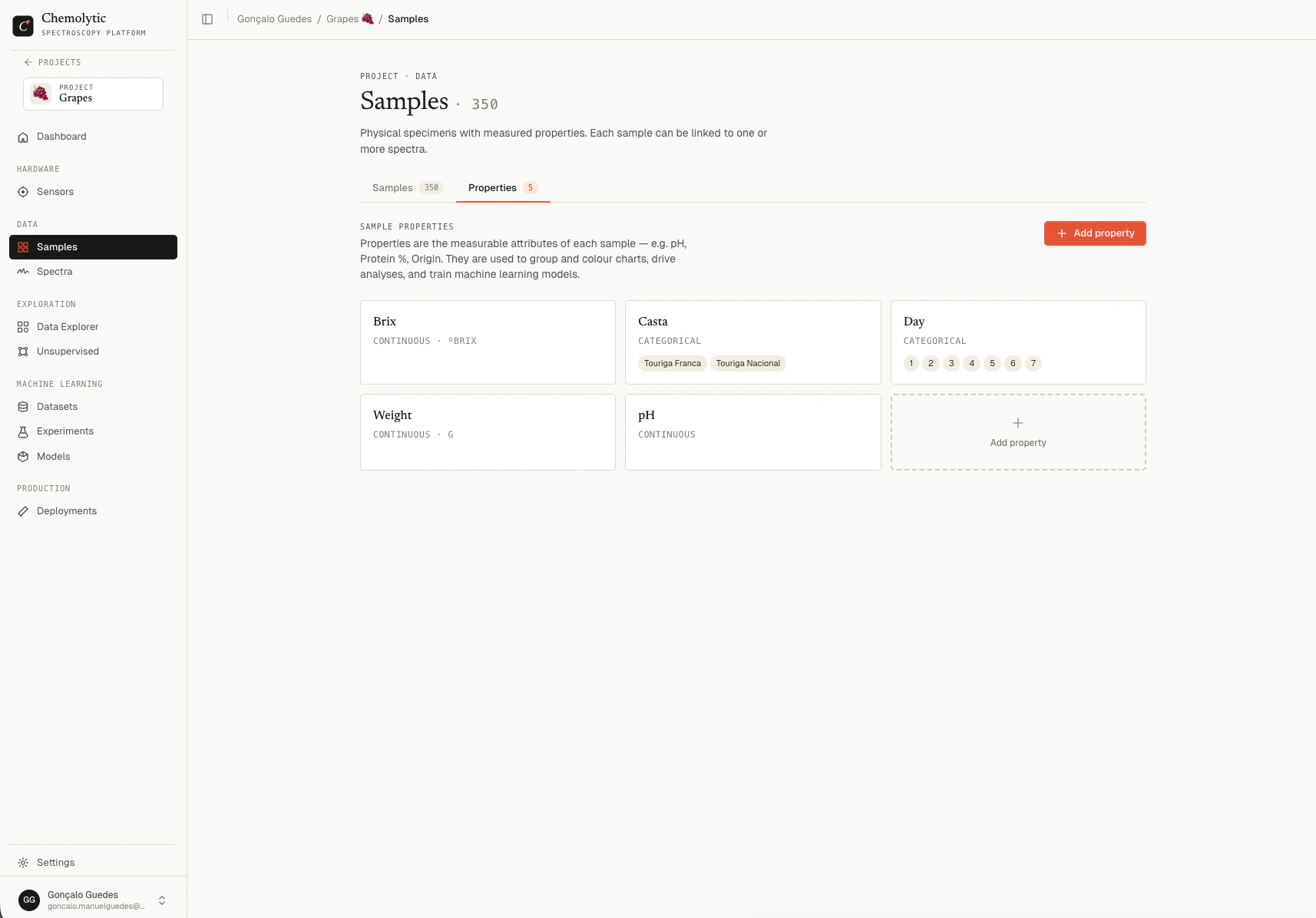 ## Creating a property
Click **Add property** to open the create dialog.
## Creating a property
Click **Add property** to open the create dialog.
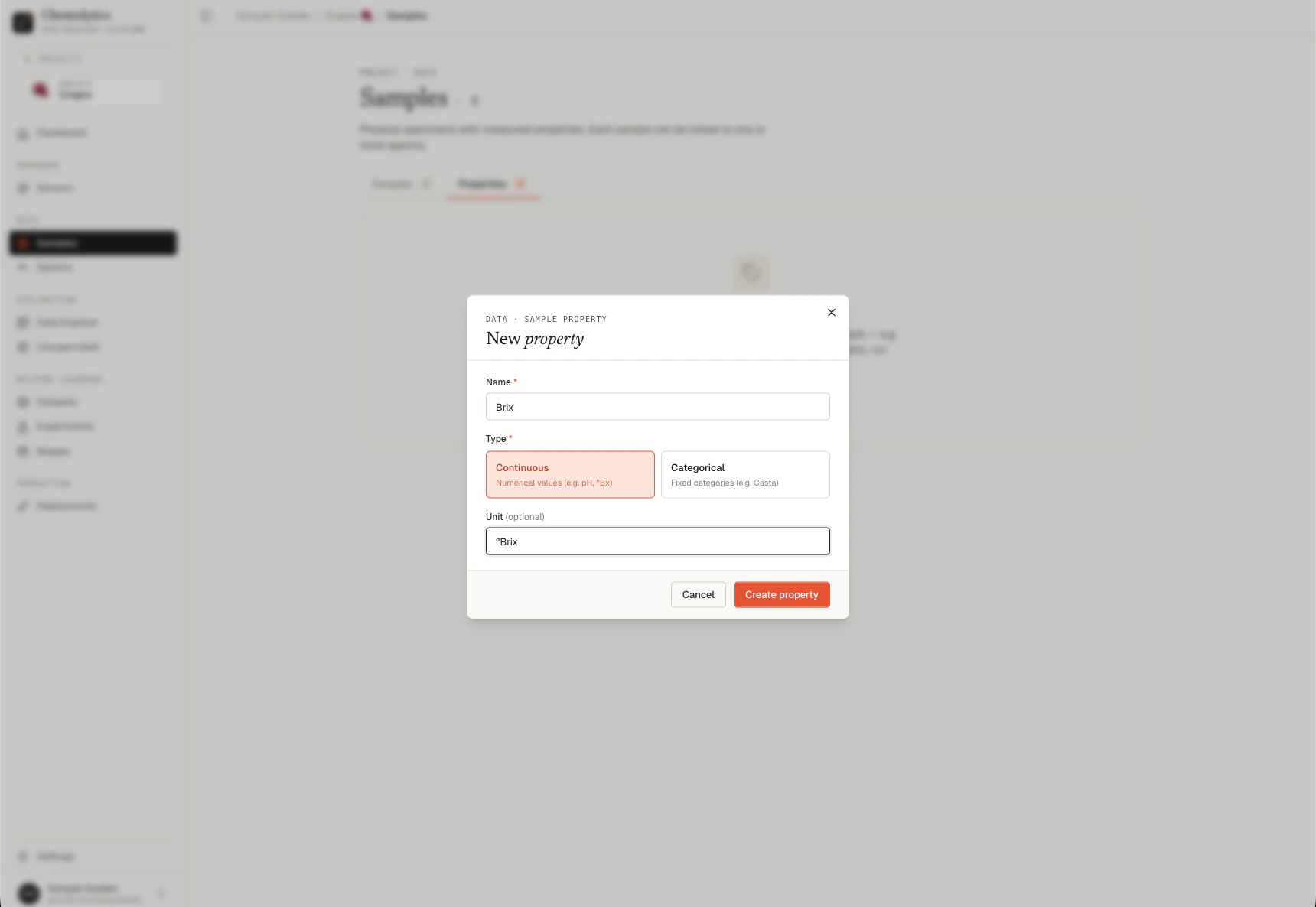 ### Fields
| Field | Required | Notes |
| -------------- | ---------------------- | ------------------------------------------------------------------------------ |
| **Name** | Yes | Unique within the project. Max 100 characters. Case-sensitive. |
| **Type** | Yes | Continuous or Categorical. Cannot be changed easily after samples have values. |
| **Unit** | No (continuous only) | Free-text label. Examples: °Bx, mg/L, %, pH. Max 50 characters. |
| **Categories** | Yes (categorical only) | Minimum 2 categories. Each up to 100 characters. |
### Continuous properties
Select the **Continuous** toggle. Enter an optional unit. The unit is shown in the samples table next to the value.
Common units: `%`, `°Bx`, `mg/L`, `pH`, `g`, `ppm`, `mol/L`.
### Categorical properties
Select the **Categorical** toggle. Type each category name and press **Enter** (or click **Add**) to add it. Click the X on a pill to remove it.
You must add at least 2 categories. The error "Add at least 2 categories" appears if you try to save with fewer.
Decide your full category list before adding samples. Adding a category later is fine, but renaming or removing one will break existing sample targets.
## Editing a property
Hover over a property card and click the pencil icon. You can change the name, type, unit, and categories.
Changing the **type** of a property after samples have values can invalidate those values. For example, changing Continuous to Categorical will reject any existing numeric value that doesn't match a category.
## Deleting a property
Hover over a property card and click the trash icon.
You can only delete a property that has **no sample targets** referencing it. If any sample has a value for this property, you must clear those values first. The error message is: "Cannot delete '{name}'. It has sample targets associated with it."
To remove a property that's in use:
1. Clear the column in your CSV and re-import (sets all values to empty for that property), or
2. Edit each sample manually and remove the property value
3. Then delete the property
## Common errors
Property names are unique within a project. Use a different name or rename the existing property first.
Some samples still have values for this property. Clear those values (manually or via CSV) before deleting.
Categorical properties must have at least 2 distinct category values. Add more categories or switch to Continuous.
The categories list is only for categorical properties. Switch the type or remove the categories.
### Fields
| Field | Required | Notes |
| -------------- | ---------------------- | ------------------------------------------------------------------------------ |
| **Name** | Yes | Unique within the project. Max 100 characters. Case-sensitive. |
| **Type** | Yes | Continuous or Categorical. Cannot be changed easily after samples have values. |
| **Unit** | No (continuous only) | Free-text label. Examples: °Bx, mg/L, %, pH. Max 50 characters. |
| **Categories** | Yes (categorical only) | Minimum 2 categories. Each up to 100 characters. |
### Continuous properties
Select the **Continuous** toggle. Enter an optional unit. The unit is shown in the samples table next to the value.
Common units: `%`, `°Bx`, `mg/L`, `pH`, `g`, `ppm`, `mol/L`.
### Categorical properties
Select the **Categorical** toggle. Type each category name and press **Enter** (or click **Add**) to add it. Click the X on a pill to remove it.
You must add at least 2 categories. The error "Add at least 2 categories" appears if you try to save with fewer.
Decide your full category list before adding samples. Adding a category later is fine, but renaming or removing one will break existing sample targets.
## Editing a property
Hover over a property card and click the pencil icon. You can change the name, type, unit, and categories.
Changing the **type** of a property after samples have values can invalidate those values. For example, changing Continuous to Categorical will reject any existing numeric value that doesn't match a category.
## Deleting a property
Hover over a property card and click the trash icon.
You can only delete a property that has **no sample targets** referencing it. If any sample has a value for this property, you must clear those values first. The error message is: "Cannot delete '{name}'. It has sample targets associated with it."
To remove a property that's in use:
1. Clear the column in your CSV and re-import (sets all values to empty for that property), or
2. Edit each sample manually and remove the property value
3. Then delete the property
## Common errors
Property names are unique within a project. Use a different name or rename the existing property first.
Some samples still have values for this property. Clear those values (manually or via CSV) before deleting.
Categorical properties must have at least 2 distinct category values. Add more categories or switch to Continuous.
The categories list is only for categorical properties. Switch the type or remove the categories.